Add "verify with Tamga" to your website or app
Two ways to check Tamga credentials on your site or app: the hosted verifier with a page kit, or your own server with @tamga-network/verifier.
Tamga Network 7 min read
There are two ways to add "verify with Tamga" to a website or an app. The quicker one uses Tamga's hosted verifier, Tamga Verify: you add a small page kit that shows a QR code or an "open in your wallet" button, and two short server endpoints that open the request and collect the approved fields. The other runs the whole check on your own server with the open-source @tamga-network/verifier package: you describe what you need in a policy, send a signed OpenID4VP request, decrypt the wallet's encrypted answer and get one of three results. Either way you first register as a verifier, so wallets know who is asking and for what.
What do you need before writing any code?
A verifier entry in the trust list. The wallet checks three things when a request arrives: who is sending it, whether that sender is registered and active, and whether the requested fields are inside the registered scope. An unregistered site still reaches the wallet, but every field it asks for is shown with an "outside the registered scope" warning, and a pseudonym request from it is refused outright.
Registering means giving the registrar (Register as a verifier):
- your domain name, which becomes your permanent identity;
- a certificate signing request for the key you will sign requests with (the key stays with you); your client identifier is derived from the resulting access certificate;
- one scope per intended use: a purpose in plain words, one credential type and the fewest fields that purpose needs, plus a privacy policy link;
- the EU common registration data: trade name, official identifier, address, contact, data protection authority.
A shop that offers a student discount, for example, asks only is_enrolled from the student credential: not the name, not the school, not the student number. Keep scopes that narrow and the wallet's consent screen stays short.
To try things before you register, use the sandbox: verify.sandbox.tamga.network has example verifiers for sign-in, age, diploma, student discount and event gates, and a working sample site at /sample-site.
Which path should you choose?
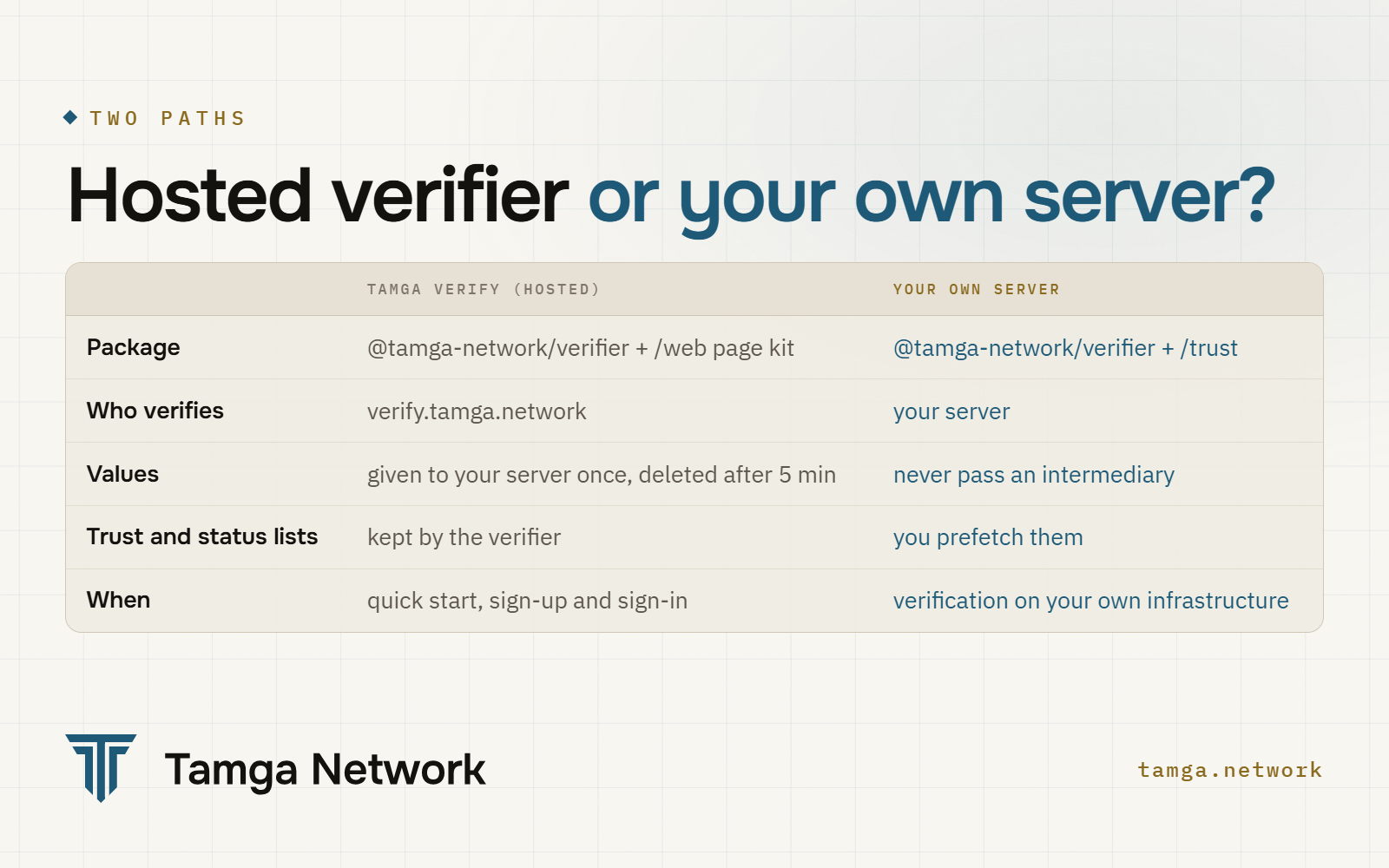
The hosted verifier suits sign-up and sign-in, and teams that want to start quickly. Your own server suits organisations that do not want credential values to pass through any intermediary, or that already run verification-heavy infrastructure. Both run the same verification pipeline; the reference verifier at verify.tamga.network is built on the same library you would install.
How does the hosted verifier work?
Four moves, and the values reach only your server:
- Your server opens a presentation. It calls the verifier with a policy name and a short-lived statement signed with the key of your access certificate (valid for at most 60 seconds, single use). There is no separate password.
- The page shows the request. On a computer a QR code, on a phone an "open in your wallet" button. The person sees only the requested fields and approves.
- The verifier checks the credential (signature, trust list, revocation, holder binding) and the page kit learns the outcome.
- Your server collects the result and, if accepted, the approved fields, once.
POST /presentations HTTP/1.1
Host: verify.tamga.network
Authorization: Bearer <statement signed with your access-certificate key>
Content-Type: application/json

{ "policy_id": "site-signup" }
The answer carries presentation_id, qr_payload, expires_at and a status_token, which your server passes to the page. The page kit is served by the verifier:
<script src="https://verify.tamga.network/tamga-verifier.js"></script>
<div id="tamga"></div>
<script>
  TamgaVerifier.mount(document.getElementById("tamga"), {
    verifier: "https://verify.tamga.network",
    policy: "site-signup",
    start: () => fetch("/tamga/start", { method: "POST" }).then((r) => r.json()),
    onResult: (presentationId) =>
      fetch("/tamga/session", {
        method: "POST",
        headers: { "content-type": "application/json" },
        body: JSON.stringify({ presentation_id: presentationId }),
      }).then(() => location.reload()),
  });
</script>
The kit does not verify anything and never sees a value; it only watches the state. The decision is made on your server:
import { createRpAssertion } from "@tamga-network/verifier";

const auth = async () => ({ authorization: `Bearer ${await createRpAssertion(rp, VERIFIER)}` });

const result = await fetch(`${VERIFIER}/presentations/${id}`, { headers: await auth() }).then((r) => r.json());
if (result.outcome !== "ACCEPTED") return; // INDETERMINATE → "try again", not "rejected"

const res = await fetch(`${VERIFIER}/presentations/${id}/claims`, { headers: await auth() });
if (res.status === 410) return; // values are handed out once
const { claims } = await res.json(); // e.g. claims.pseudonym, claims.given_name
Only the site that opened a presentation can read its result; anyone else gets 404. The values are given once and deleted five minutes after the result, so process them straight away. On the hosted verifier, policy names and their field sets are agreed with the network (an over-18 check, for example, uses only the age_over_18 field). The full walk-through, including passkeys after sign-up, is in Add "Sign in with Tamga".
How do you verify on your own server?
With @tamga-network/verifier and @tamga-network/trust. Before the first request, load the trust lists through TrustSource (how the lists are checked) and start prefetching revocation lists on a timer; nothing should be downloaded at the moment of a check. Then:
import { dcqlFromPolicy, createPresentationRequest, decryptResponse, verifyPresentation,
         pemRpSigner, PrefetchStatusCache, type Policy } from "@tamga-network/verifier";

const signer = await pemRpSigner(RP_KEY_PEM, RP_CERT_PEM); // client_id comes from the certificate
const req = await createPresentationRequest({ signer, dcql: dcqlFromPolicy(policy),
  responseUri: "https://shop.example.com/vp/response", requestUriBase: "https://shop.example.com/vp/req" });
// req.qrPayload → QR code or deep link; it carries no personal data

// the wallet POSTs an encrypted answer to responseUri
const answer = await decryptResponse(jweBody, req.encPrivateKey);
const { result, claims } = await verifyPresentation({ presentation: answer.vp_token["student"][0],
  aud: signer.clientId, nonce: req.nonce, policy, policyCredentialId: "student",
  trust, statusCache, rootCertsDer, rp: trust.relyingParty(signer.clientId) });
The steps behind verifyPresentation are fixed and numbered: format and signature (A), credential type (B), trust (C), revocation (D) and your own policy (E). They are listed in the verification API. A tested, runnable version of this code is among the code examples; the guide is Verify on your server.
What is a policy, and why is it not code?
A policy names what you need: which credential type, which fields, which assurance level, how fresh the lists must be. The request the wallet sees (a DCQL query) is generated from the policy, never written by hand. Asking for more therefore takes a policy change rather than a code change, and a policy can never ask beyond the scope in your registration (rule AP6). How the request and the encrypted answer are built is in the OpenID4VP and DCQL deep dive.
How do you read the result?
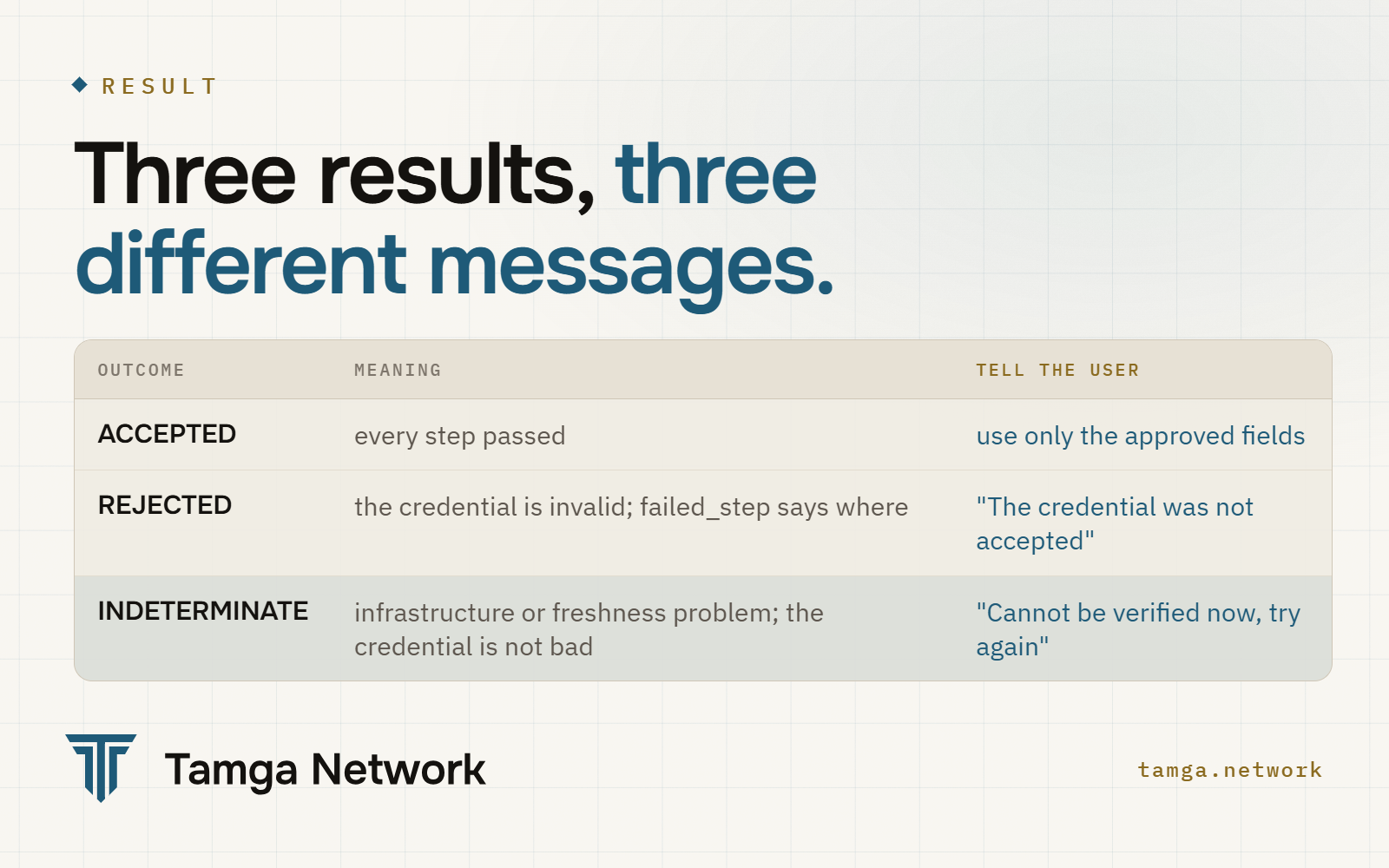
The third result is the one to get right. INDETERMINATE means the verifier could not check right now: a list could not be fetched or is too old. The credential may be perfectly valid. Show "cannot be verified right now, please try again" and never put it in the same bucket as REJECTED (rule AP2). The difference between "this diploma is fake" and "I cannot check right now" can decide whether someone gets hired.
The result object lists the checks performed and skipped, which you may keep for audit. It carries field names, never values. Do not log personal data, including names and keys.
Can you check age without seeing a date of birth?
Yes, and it is live on Tamga Verify as the age-over-18-zk policy. A policy in the mso_mdoc_zk format asks for a zero-knowledge proof: the wallet proves that the identity credential of a registered institution says age_over_18 = true, and you learn nothing else. You do not see the credential, the date of birth, the institution's signature or the device key, and two proofs from the same person cannot be linked (ADR-0032).
A few practical points from the guide:
- Verification runs on the bundled WebAssembly, about 3 seconds per proof on a desktop. A native build for high volume takes about 0.2 to 0.3 seconds.
- Only circuits listed in the signed trust list are accepted.
- A ZK presentation carries no revocation index, so the policy must say
accept_unrevocable_zk: trueexplicitly. If you need a revocation check, use the classicmso_mdocpolicy. - On the wallet side, the Android proving library is ready and iOS is still pending. A wallet that cannot prove falls back, if your policy allows it, to the classic mdoc check, which discloses only
age_over_18. Offer both.
The sandbox's age-zk example verifier shows the flow end to end. Circuits, the trust list's role and the limits are in Zero-knowledge in Tamga.
Frequently asked questions
Does my site see the person's whole credential?
No. It receives only the fields the person approved, and those fields must sit inside your registered scope. With a zero-knowledge policy it receives only a yes or no.
Can the issuing institution see that we checked a credential?
No. Revocation lists are fetched in advance and cached; no request goes to the institution, or to the network, at the moment of a check.
Does it work only with Tamga Wallet?
No. Any wallet whose provider is listed in the trust list and follows the network's wallet rules can answer your request.
What should we store after a sign-in?
An account key, not personal data. The sample site stores a keyed hash of the site-specific pseudonym, which another site cannot match because it sees a different pseudonym for the same person.
Can we test without registering?
Yes, in the sandbox. Its example verifiers and sample site work with credentials from the sandbox's example institutions. Real credentials need a registered verifier on the real network.
Sources
- OpenID for Verifiable Presentations 1.0
- OpenID4VC High Assurance Interoperability Profile (HAIP) 1.0
- Longfellow ZK (open-source proof system)
- Tamga Network: Add "Sign in with Tamga" · Verify on your server · Register as a verifier
- Code examples · @tamga-network/verifier · API reference
- SDKs · Joining as a verifier
Related
- Post · StandardsOpenID4VP and DCQL deep dive: request to verdictHow a verifier requests and checks credentials with OpenID4VP 1.0: x509_hash signed requests, DCQL, encrypted direct_post.jwt, the A–E pipeline.
- Post · PrivacyZero-knowledge in Tamga: Longfellow, circuits, trust listHow Tamga Network checks "over 18" with a Longfellow zero-knowledge proof, why circuits sit in the signed trust list, and what works today.
- Post · NetworkHow a signed trust list works, from registration to checkHow Tamga Network's signed trust lists work: two levels, signing, publication cadence, freshness, the anchor log and what a verifier checks.
- Post · NetworkHow an institution joins Tamga NetworkHow an institution joins Tamga Network: try it in the sandbox, apply with registration data and a CSR, get listed, issue the first credential.
- LearnBecoming a verifierRegistration, an access certificate and what may be asked of a person: the verifier's path.
Build on the network
Learn the concepts from scratch, or see how an institution, verifier, wallet or state joins.