How an institution joins Tamga Network
How an institution joins Tamga Network: try it in the sandbox, apply with registration data and a CSR, get listed, issue the first credential.
Tamga Network 8 min read
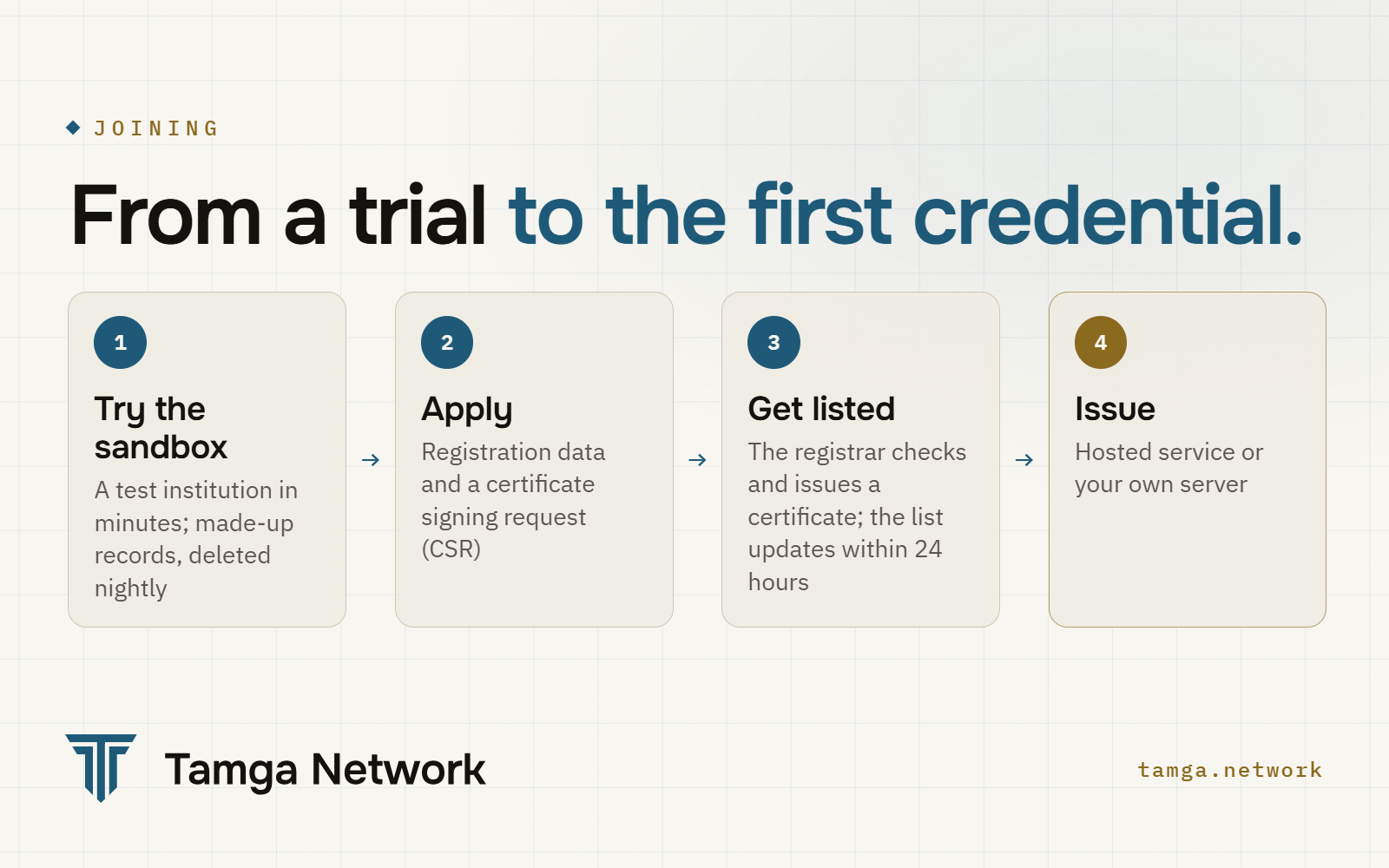
An institution joins Tamga Network in two stages. First it tries the whole flow in the sandbox, where it can open a test institution by itself in a few minutes and issue credentials from made-up records to a wallet. Then it applies to the real network with its registration data and a certificate signing request; the registrar checks the file, the root certificate authority signs the institution's certificate, and the institution appears in the signed trust list within 24 hours, authorised for specific credential types. From that point it issues credentials through the hosted service and the Institution Console, or from its own server.
Which institutions can join?
Any institution that issues documents people need to prove something: universities and schools, hospitals and professional chambers, public bodies, companies (employee and authorisation credentials) and event organisers (tickets bound to a person). In the list each institution has a domain (EDUCATION, HEALTH, GOVERNMENT, FINANCE, LOGISTICS, EVENTS, IDENTITY, OTHER) and a class:
| Class | Meaning |
|---|---|
PUB | a credential issued by a public body |
QUALIFIED | a qualified credential |
EAA | an ordinary electronic attestation, such as a student credential or a ticket |
Joining records an institution; it does not give it rights it does not already have. The right to issue a diploma comes from the law that governs the university. The network's job is to make that right checkable by machine.
Institutions that want to check credentials rather than issue them (employers, websites, gates) join as registered verifiers. That path is in Add "verify with Tamga" to your website or app.
How can an institution try it before applying?
In the sandbox, the network's separate test environment at sandbox.tamga.network. Nothing there touches the real network: it has its own test root certificate, its lists are marked as test lists, and a real verifier does not accept its credentials.
The trial takes a few minutes (sandbox guide, §9):
- On the sandbox page choose Try your institution and type a made-up institution name; "(TEST)" is added to it. No email, phone number or personal name is asked for. Real institution names and official-body words are refused.
- The test institution is added to the sandbox trust list at once, with its own signing certificate from the sandbox's test-institutions certificate authority.
- Open the Institution Console with the one-time invitation link and create a passkey.
- Enter records one by one or upload a CSV file (up to 200 rows). A record that contains a number passing the Turkish identity number checksum is refused, so only deliberately invalid numbers get in.
- Choose Issue at the desk next to a record, scan the QR code with a wallet connected to the sandbox and enter the PIN.
- Show the credential to the "Diploma check" or "Student discount" example verifier on the sandbox page.
Today the test institution is an education institution (student credential and diploma). Everything (the institution, its account, records and certificates) is deleted every night. The limits keep it fair: at most 30 test institutions at a time, 200 records each and 100 offers an hour.
What does the application to the real network contain?
The application is one file with three kinds of content: who the institution is, what it will issue, and where its data comes from.
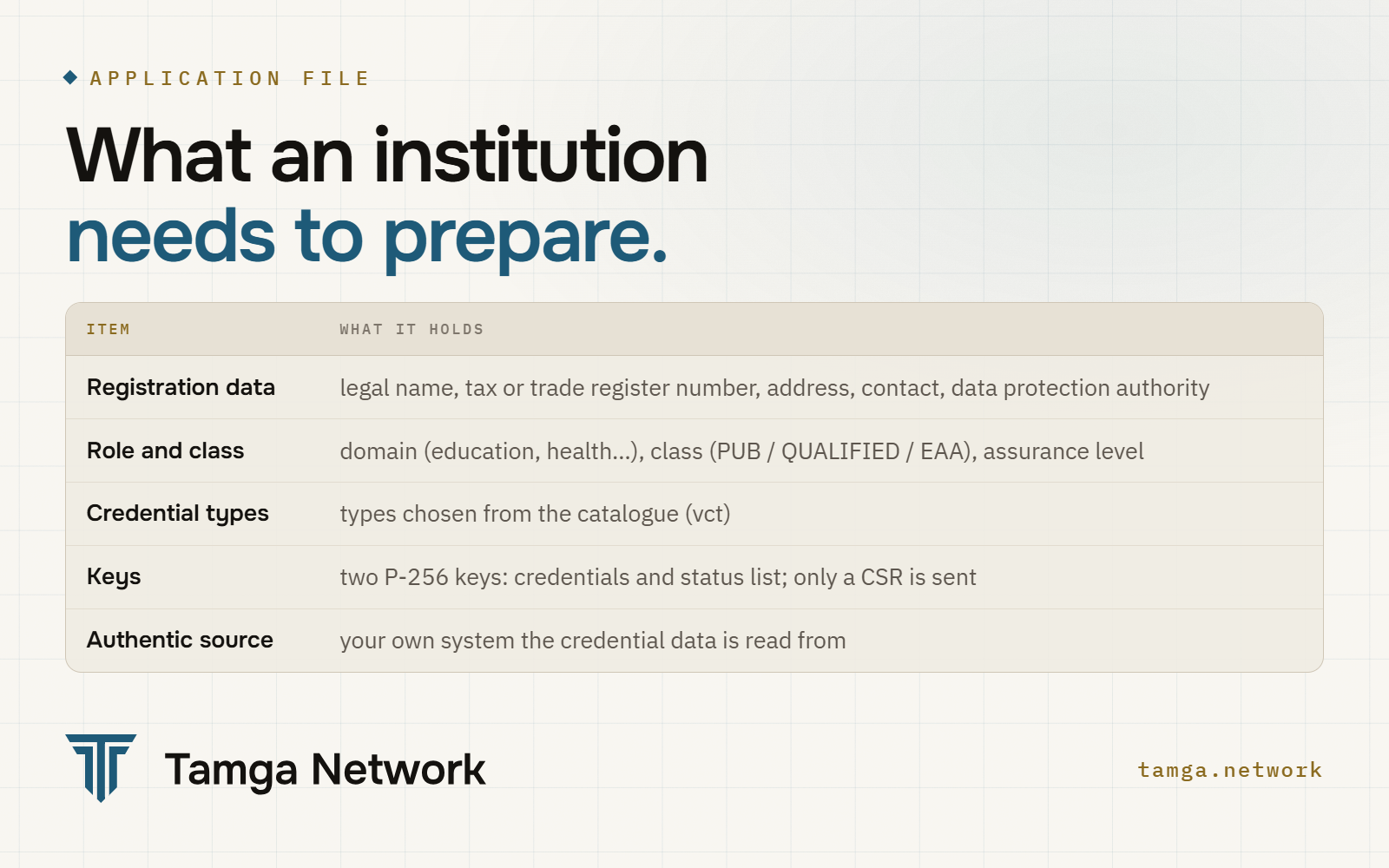
The registration data is the EU's common data set for participants: legal and trade name, official identifier (tax number or trade register number), postal address, contact, and the data protection authority people can complain to (ADR-0024). The same model is used for EU wallet-relying parties in Implementing Regulation (EU) 2025/848. If a field is missing, no entry is made, and the registrar lists every gap at once.
{
  "slug": "example-uni",
  "legal_name": "Example University",
  "category": "EDUCATION",
  "class": "EAA",
  "assurance": "I2",
  "vcts": ["urn:tamga:edu:StudentCredential:1", "urn:tamga:edu:DiplomaCredential:1"],
  "authentic_source": { "name": "Example University Student Information System", "mode": "REMOTE" },
  "identifiers": [{ "scheme": "TR-VKN", "value": "TR0000000000" }],
  "contact": { "support_uri": "https://example.edu.tr/support" },
  "supervisory_authority": { "name": "Kişisel Verileri Koruma Kurumu (KVKK)", "country": "TR" }
}
The full sample is in the developer guide: Join the network as an institution.
Two lines in that file say a lot about how the network works. vcts lists the credential types the institution wants to issue, chosen from the public schema catalogue; a new type goes through its own approval first. authentic_source names the system the data actually comes from. The network keeps no register of people: at issuance the details are read from the institution's own system, through an endpoint the institution controls (ADR-0020).
Alongside the file come the legal pieces: a participation agreement, a data processing agreement if the hosted service is used (the institution stays the data controller), an updated privacy notice for the people it issues to, and proof that it is entitled to issue the credential.
Why does the institution's key never leave the institution?
Because the key is what makes a credential the institution's own. Whoever holds it can sign in the institution's name, so it stays with the institution at every step.
The institution generates two P-256 key pairs: one signs the credentials, the other signs its revocation list. It sends only a certificate signing request (CSR) for each:
openssl ecparam -name prime256v1 -genkey -noout -out issuer.key.pem
openssl req -new -key issuer.key.pem \
  -subj "/CN=Example University/O=Example University/C=TR" -out issuer.csr.pem
In production the key belongs in a hardware security module (HSM) or a cloud key management service (KMS). The registrar checks the CSR's signature and returns a certificate from the root certificate authority, valid for two years (at most three).
What happens when the institution is registered?
The registrar adds the institution to the Türkiye list and re-signs it. Within 24 hours the entry is live at trust.tamga.network. It holds an issuer_id computed from the certificate's fingerprint, the class, the assurance level, the authorised credential types, the status and its history. A registration certificate (ETSI TS 119 475) is generated automatically at every publication, so wallets can check the entry that way too. What the entry looks like, and how verifiers read it: How a signed trust list works.
Authorisation is per credential type. A type can be added later, or ended. An ended authorisation is not deleted, so credentials issued before the end still verify.
How does the institution issue its first credential?
There are two ways, and the credential is the same in both: issued in the institution's name and signed with its key.
| Hosted service | Your own server | |
|---|---|---|
| What runs it | Tamga's issuance service and the Institution Console | the @tamga-network/issuer package (OpenID4VCI) |
| How you connect | the console, or a scoped API key from your system | your own deployment |
| Good for | starting quickly, desk issuance, small teams | institutions that want everything in-house |
The Institution Console is where staff work: they sign in with a passkey, manage records, issue at the desk with a QR code and a PIN given separately, revoke or suspend credentials and see issuance statistics. The statistics never contain personal data. Systems can do the same through an API key bound to the institution and limited in scope (ADR-0016).
Before each credential the institution verifies the person's identity at the level that credential type requires. A person can also start from the wallet: they pick the institution, and the institution matches them through the verified identity credential already in their wallet.
Every credential, a diploma included, is issued as a batch of 10 copies with separate keys, so the wallet can show a fresh copy each time and two verifiers cannot link the same person by a repeated value (OpenID4VCI deep dive). The credential can go to any wallet whose provider is listed in the trust list. The institution does not choose a wallet for its people.
What can change after joining?
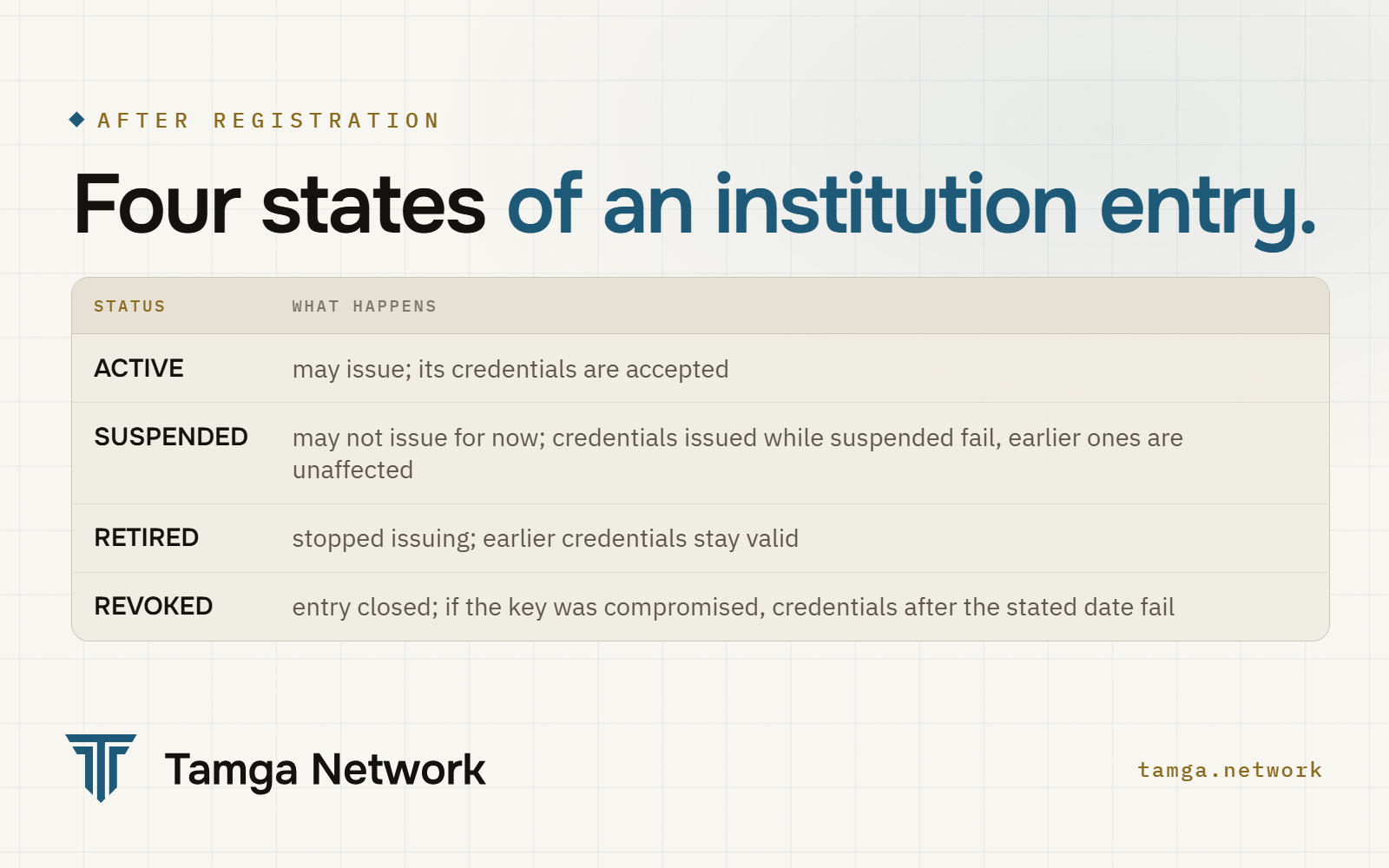
One rule holds across all of them: a verifier judges a credential by the institution's status on the day the credential was issued, not by its status today. An institution that stops issuing does not take its graduates' diplomas down with it. If a key is compromised, the entry is revoked with a date, and only credentials from that date on stop passing.
How does a real joining project run?
The Join page lists six steps: agree the scope (which credentials, which pilot group), choose or design the credential type, sign the agreements and update the privacy notice, register, integrate and test end to end in the sandbox, then go live with a small group first. To start, write to partners@tamga.network with the institution's name and whether it wants to issue, verify or both.
Frequently asked questions
Does the institution have to hand over its student or member database?
No. The network keeps no register of people. Data is read from the institution's own system at the moment of issuance and goes straight to the person's phone.
Does the institution need its own servers?
No. The hosted issuance service and the Institution Console are enough to start. Institutions that prefer to run issuance themselves can use the open-source @tamga-network/issuer package.
Can a sandbox test institution be moved to the real network?
No. Sandbox institutions, records and certificates are deleted every night, and the sandbox root is not trusted on the real network. The real network needs its own application and keys.
Which wallets can receive the institution's credentials?
Any wallet whose provider is registered in the trust list and follows the network's wallet rules. Tamga Wallet is one of the wallets on the network, not the only one.
What happens if the institution's signing key is stolen?
The entry is revoked with an invalidates_from date. Credentials signed from that moment on fail verification; earlier ones are unaffected. The institution then registers a new certificate.
Sources
- Implementing Regulation (EU) 2025/848: registration of wallet-relying parties
- ETSI TS 119 475 V1.1.1: relying party attributes and registration certificates
- Tamga Network: Join the network as an institution · Sandbox · Issue credentials
- ADR-0024: participant registration data · ADR-0041: sandbox test institutions
- Tamga Rulebook (participation rules) · Join the network · Joining as an issuer
Related
- Post · NetworkWhat is a trust network, and what does Tamga Network do?A trust network publishes signed lists of who may issue and check digital credentials. What Tamga Network does, what it does not do, where to start.
- Post · NetworkHow a signed trust list works, from registration to checkHow Tamga Network's signed trust lists work: two levels, signing, publication cadence, freshness, the anchor log and what a verifier checks.
- Post · NetworkAdd "verify with Tamga" to your website or appTwo ways to check Tamga credentials on your site or app: the hosted verifier with a page kit, or your own server with @tamga-network/verifier.
- Post · StandardsOpenID4VCI deep dive: offers, DPoP, proofs, batchesOpenID4VCI 1.0 issuance in Tamga: offers and tx_code, PAR and PKCE, DPoP, the nonce endpoint, key proofs, wallet attestation, batches of 10.
- Tamga NetworkJoin the network
Build on the network
Learn the concepts from scratch, or see how an institution, verifier, wallet or state joins.